
この記事のまとめ
- けん玉・こまの練習アプリ「Skill Master」に、iPhoneでも使えるWeb版ができました。無料・登録なしで、ブラウザで開くだけです。
- KWC 2026 の技をレベル別のマトリックスで見て、そのままマイトリックに保存し、ルーティンで練習できます。
- 2人で持ち時間を競う新しいゲーム「トリッククロック」も入りました。大会の待ち時間に、ぜひどうぞ。
In short: Skill Master, a kendama and spin-top practice app, now has a free web version that works on iPhone, Android and PC — no install, no sign-up. Browse the KWC 2026 tricks in a level matrix, save them to My Tricks, practice with a routine, and play the new two-player game “Trick Clock.”
▶ アプリを開く|Open the app(無料・登録なし|Free, no sign-up)
- iPhoneでも使えるけん玉アプリ、作り直しました|Rebuilt so iPhone users can use it too
- 無料・登録なしで、ブラウザで開くだけ|Free, no sign-up, just open it in a browser
- KWC 2026 の技を、マトリックスで見わたす|See the KWC 2026 tricks at a glance in a matrix
- 選んだ技をマイトリックに保存して、ルーティンで練習|Save tricks to My Tricks and practice with a routine
- 新しいゲーム「トリッククロック」で、2人で勝負|New two-player game: Trick Clock
- Android版とのちがい|Differences from the Android app
- Miyagi Kendama Crewsに先行配布|Early access for Miyagi Kendama Crews
- 記録はスマホの中だけ。非公式の個人アプリです|Records stay on your phone. An unofficial, personal app
- まとめ|Summary
iPhoneでも使えるけん玉アプリ、作り直しました|Rebuilt so iPhone users can use it too
みなさん、けん玉の練習アプリって、何を使っていますか?
じつは数年前、けん玉とこまの練習アプリ(Android版の「Kendama x SpinTop」)を作りました。そのとき手元にあったのが Android のスマホだけだったので、Android 専用のアプリにして、Google Play で公開しました。
ところが、日本ではスマホといえば iPhone という人がとても多いんですよね。とくに10代〜20代は、その割合がさらに高い。作ったのはいいけれど、開ける人が少なくて、あまり使ってもらえていませんでした。
一方で、画面を見せると「iPhoneでも使えるようにしてほしい」という声を、何人かからいただいていました。
そこで今回、AI(Claude Code)の力を借りて、プログラムを書き直し、中身とデザインも見直して、ブラウザで動くWeb版を作りました。
A few years ago I made an Android-only kendama and spin-top app, because an Android phone was all I had. But in Japan a large share of people — especially teens and people in their twenties — use iPhones, so few could open it, and several asked for an iPhone version. This time, with help from AI (Claude Code), I rewrote the code and redesigned the content to make a web version that runs in any browser.
無料・登録なしで、ブラウザで開くだけ|Free, no sign-up, just open it in a browser
Web版は、インターネットにつながるスマホやパソコンなら、だれでも開けます。iPhone でも Android でもパソコンでも使えて、お金も登録もいりません。
使い始めるのはかんたんです。
- iPhone(Safari):下の共有ボタン(□に↑)→「ホーム画面に追加」→「追加」
- Android(Chrome):右上の「︙」→「ホーム画面に追加」→「インストール」
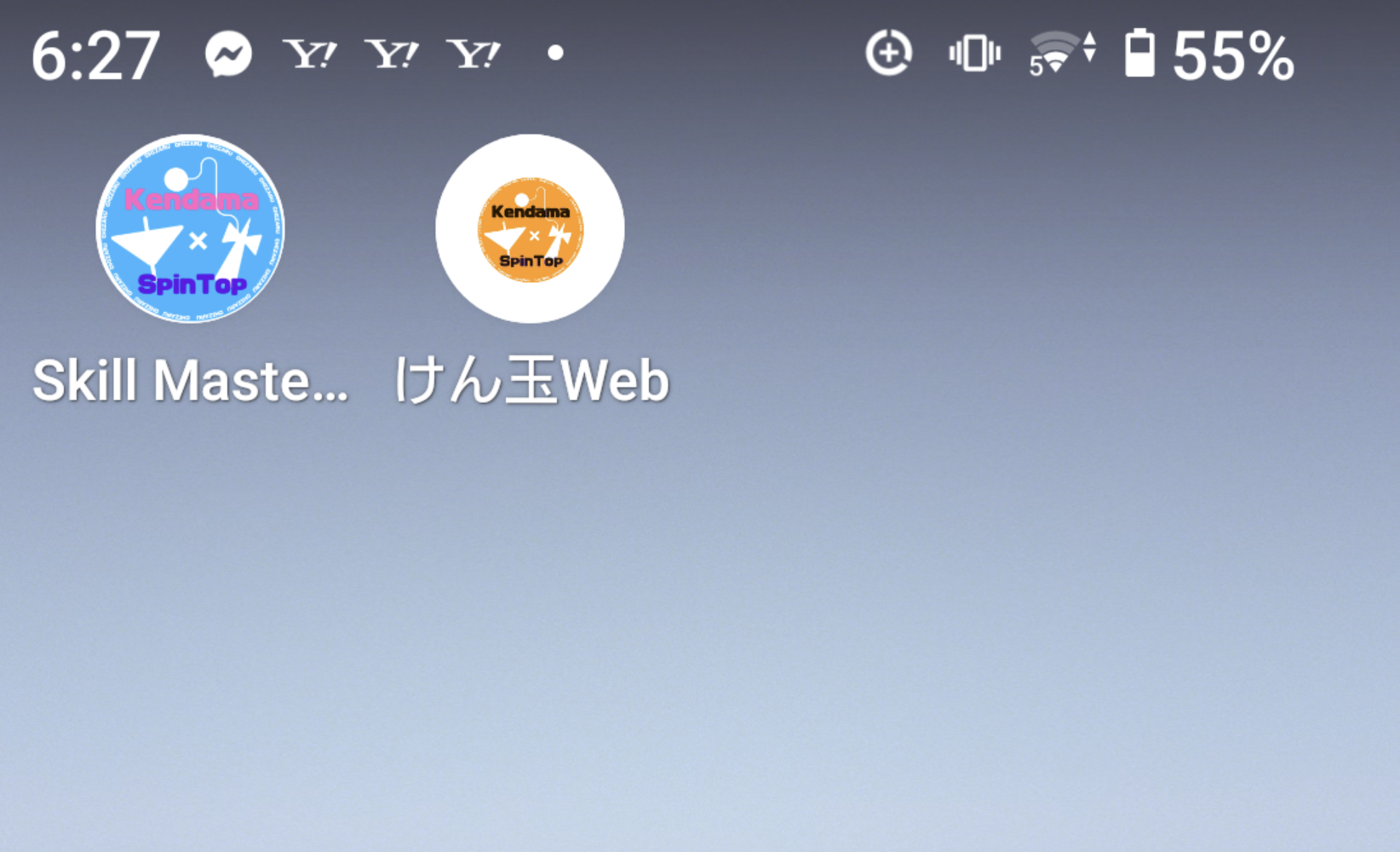
ホーム画面に追加すると、オレンジのアイコン「けん玉Web」から、ふつうのアプリのように開けます。一度開いておけば、画面と技のデータがスマホに保存されるので、ネットがつながらない体育館でも使えます(技の動画はYouTubeなので、見るときはネットが必要です)。
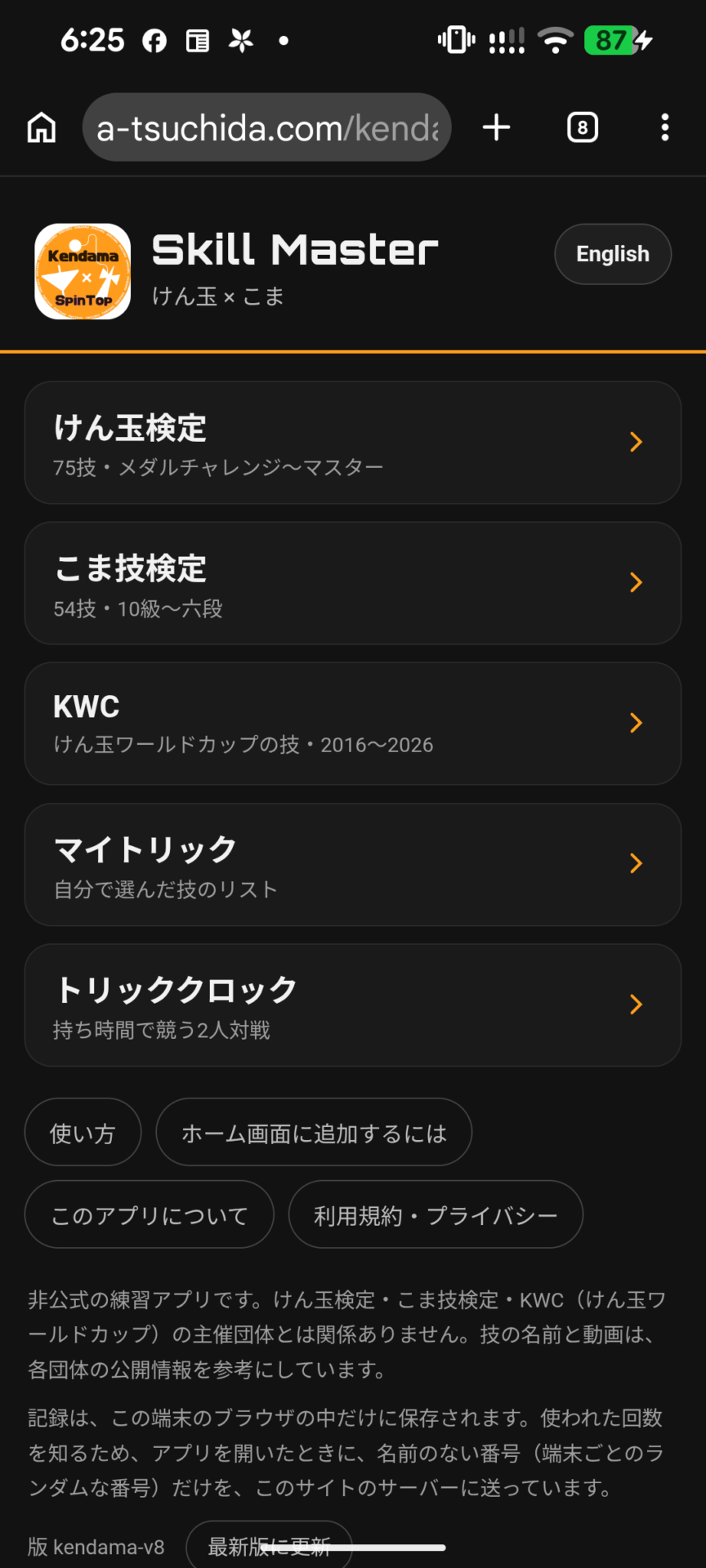
画面は、右上の「English」ボタン1つで、日本語と英語を切り替えられます。技の名前も英語になるので、海外のけん玉仲間とも、同じアプリで練習できますよ。
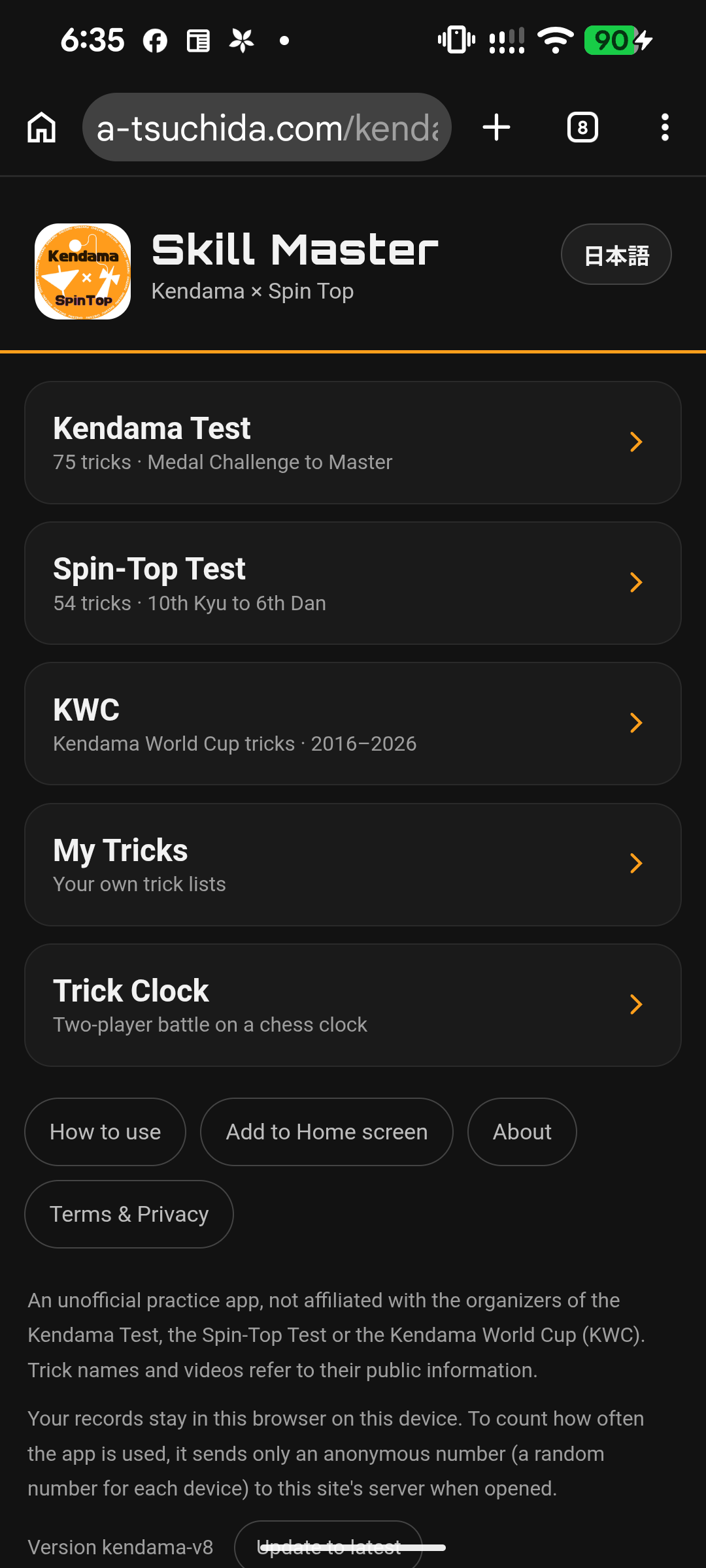
Anyone with an internet-connected phone or computer can use it — iPhone, Android or PC, free and with no account. Add it to your Home screen (iPhone: Share → “Add to Home Screen”; Android: ⋮ → “Add to Home screen”) and it opens like a normal app. Once opened, the app and trick data are saved on your phone, so it works offline (trick videos are on YouTube and need a connection). Switch between Japanese and English with the button at the top right. Trick names switch too, so you can practice with kendama friends overseas using the same app.
KWC 2026 の技を、マトリックスで見わたす|See the KWC 2026 tricks at a glance in a matrix
今年のけん玉ワールドカップ(KWC 2026)は、11月21日(土)・22日(日)に広島県廿日市市で開かれます(出典:PR TIMES、2026-11-08 閲覧)。
Web版では、KWC の技リストをマトリックス(表)で見られるようにしました。縦が番号、横がレベルなので、「Level 3 から Level 5 で、どれが自分にできそうか」を横に並べて見くらべられます。マスをタップすると、技名の全文と、「選ぶ」「動画」のボタンが出ます。
KWC は2016年から2026年まで、全部の年度が入っています。けん玉検定(75技)とこま技検定(54技)の一覧もあります。
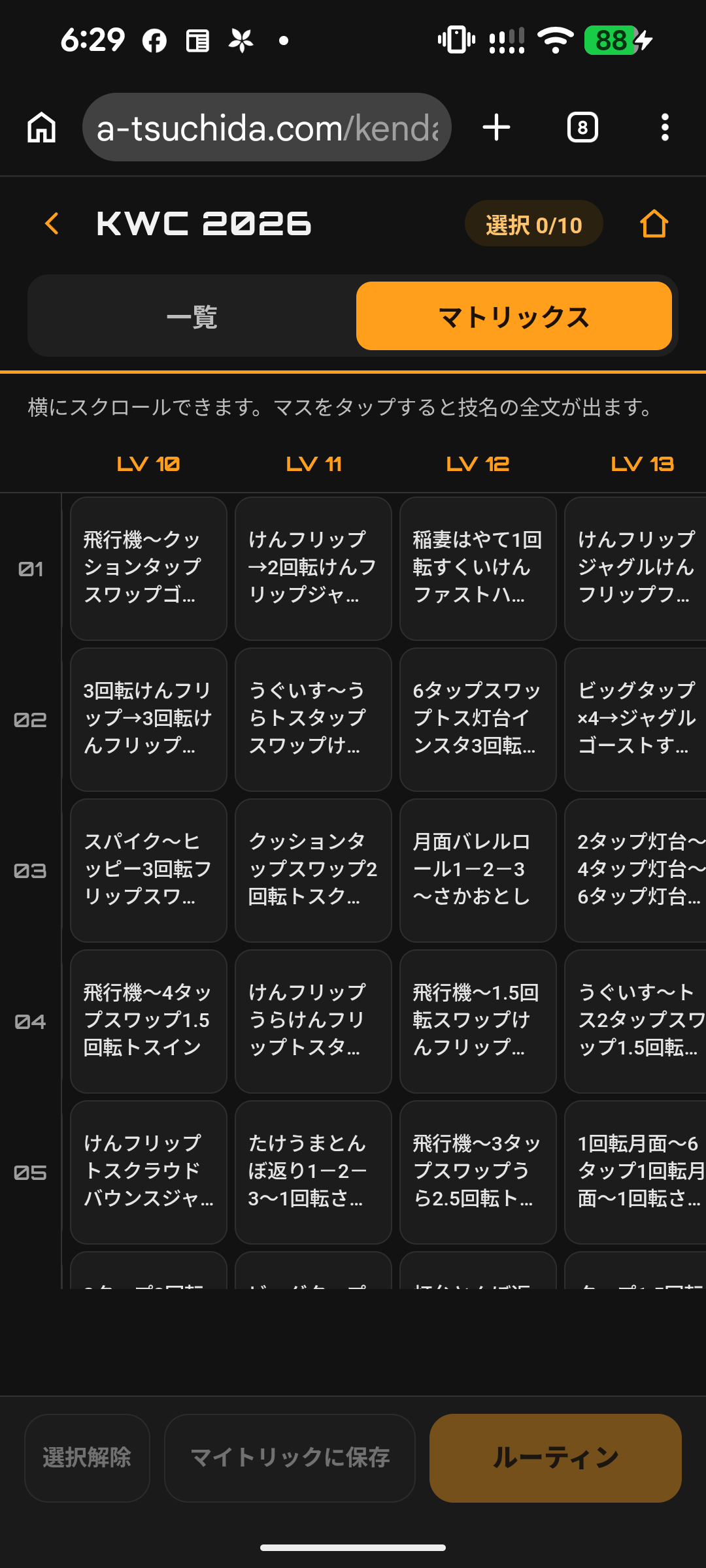
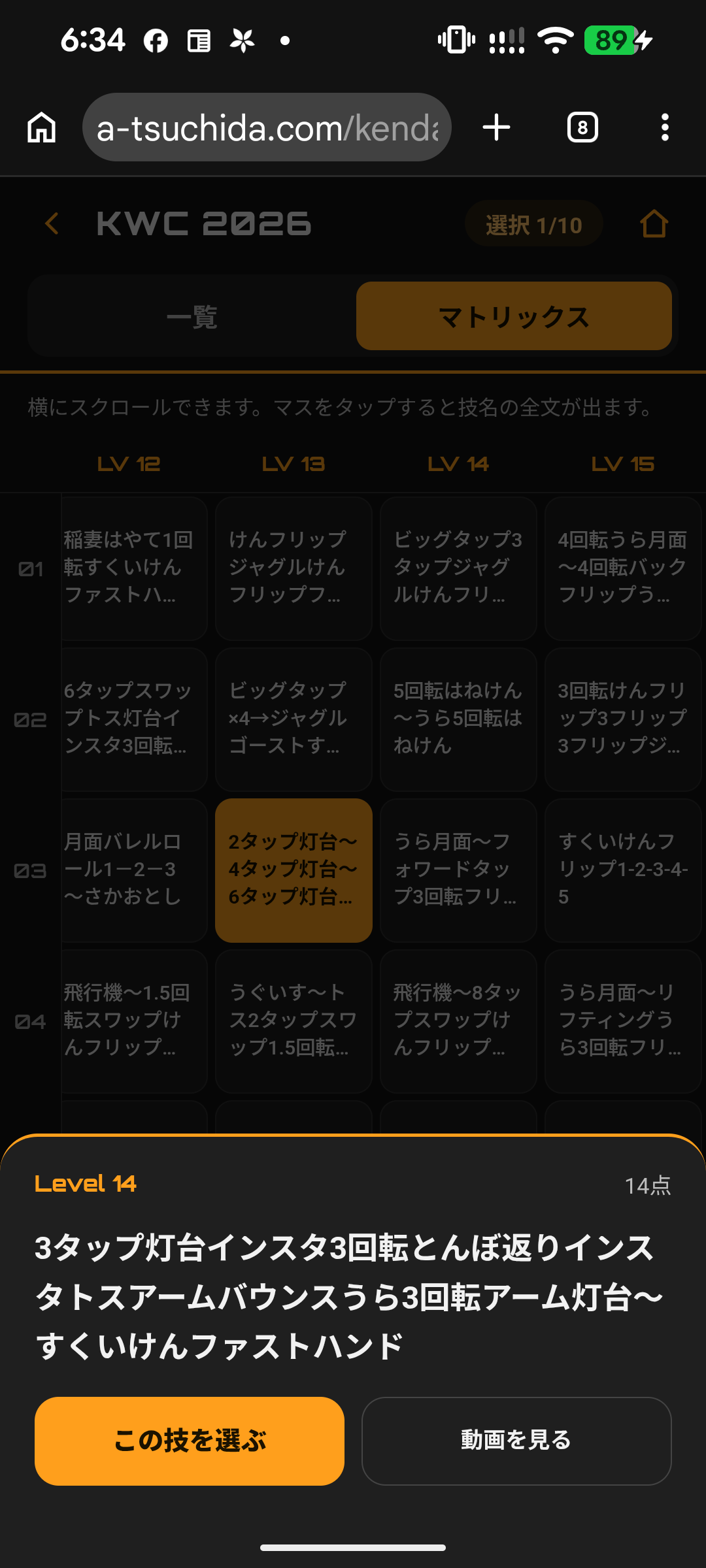
This year’s Kendama World Cup (KWC 2026) takes place on November 21–22 in Hatsukaichi, Hiroshima. In the web version you can view each KWC trick list as a matrix — numbers down, levels across — so you can compare levels side by side. Tap a cell to see the full trick name, select it, or watch the video. All years from 2016 to 2026 are included, plus the Kendama Test (75 tricks) and Spin-Top Test (54 tricks).
選んだ技をマイトリックに保存して、ルーティンで練習|Save tricks to My Tricks and practice with a routine
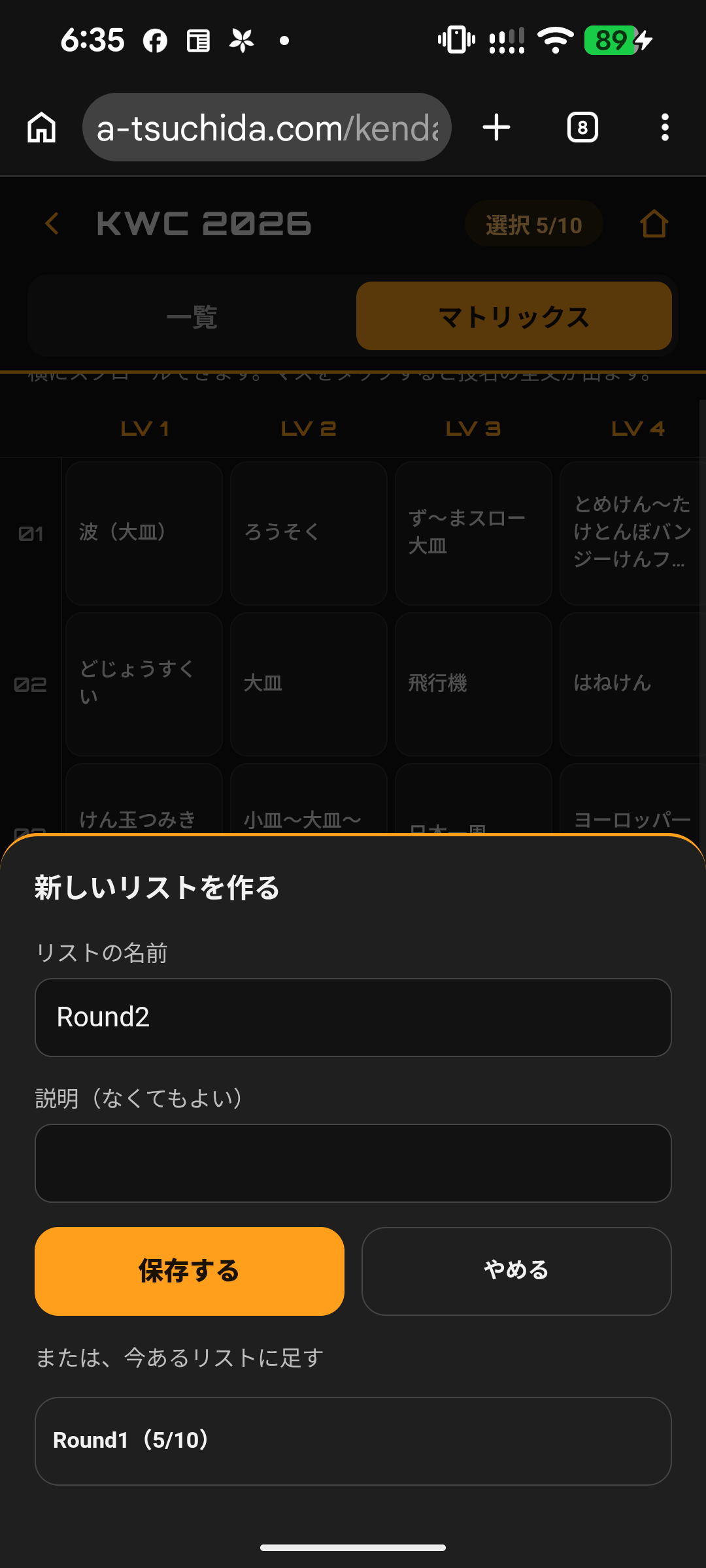
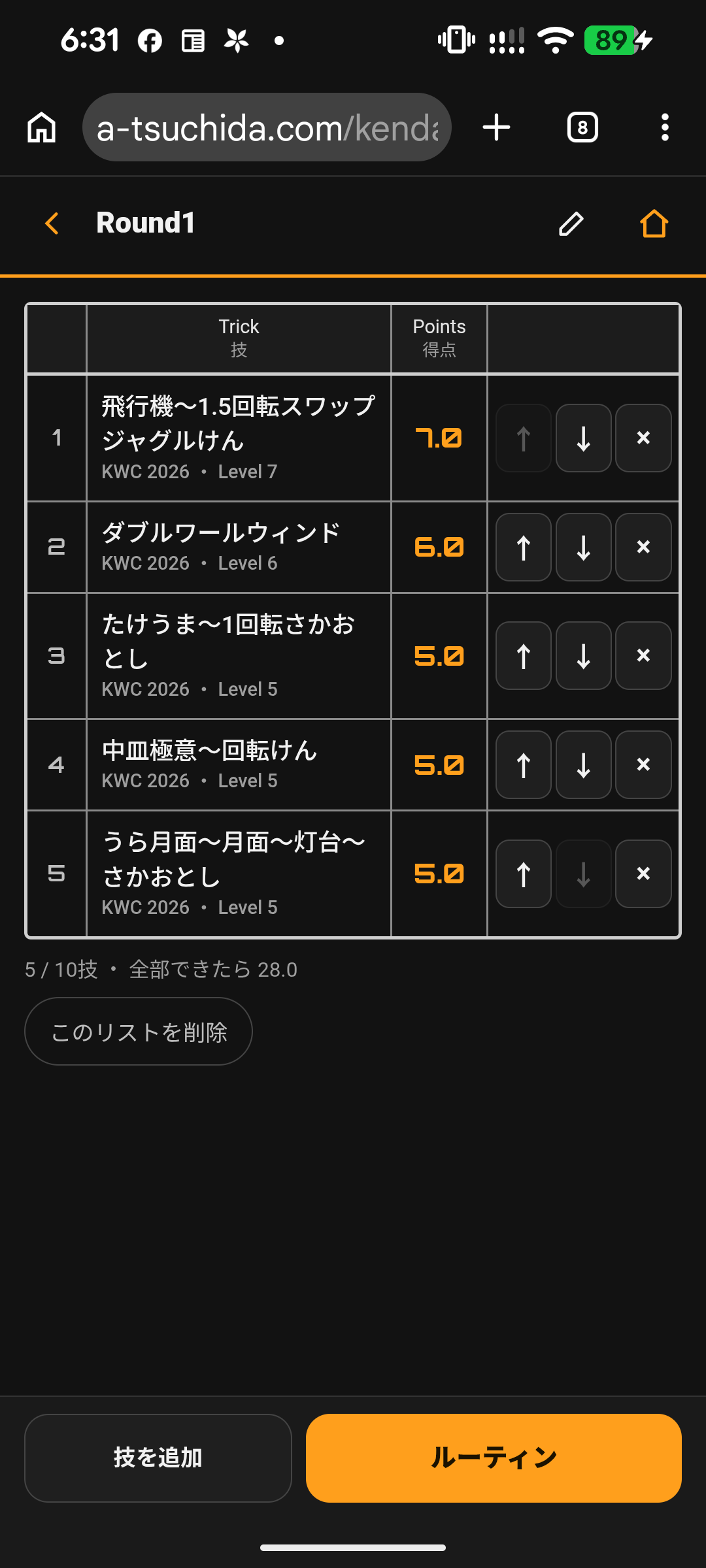
マトリックスから技を選んだら(最大10技)、そのままマイトリックに保存できます。たとえば「KWC 2026 大会 Round 1」のように名前を付けておけば、次からはホームの「マイトリック」からすぐ呼び出せます。リストの中の技は、↑↓で並べ替えたり、×で外したりできます。
練習はルーティンで。大会のスコアシートのような表に、選んだ技が並びます。時間(1分・3分・時間なし)を選んでスタートし、できた技の「Check」をタップすると✓が付いて、合計点が出ます。✓を付けた技は、日付といっしょに「できた」として技一覧に記録されます。
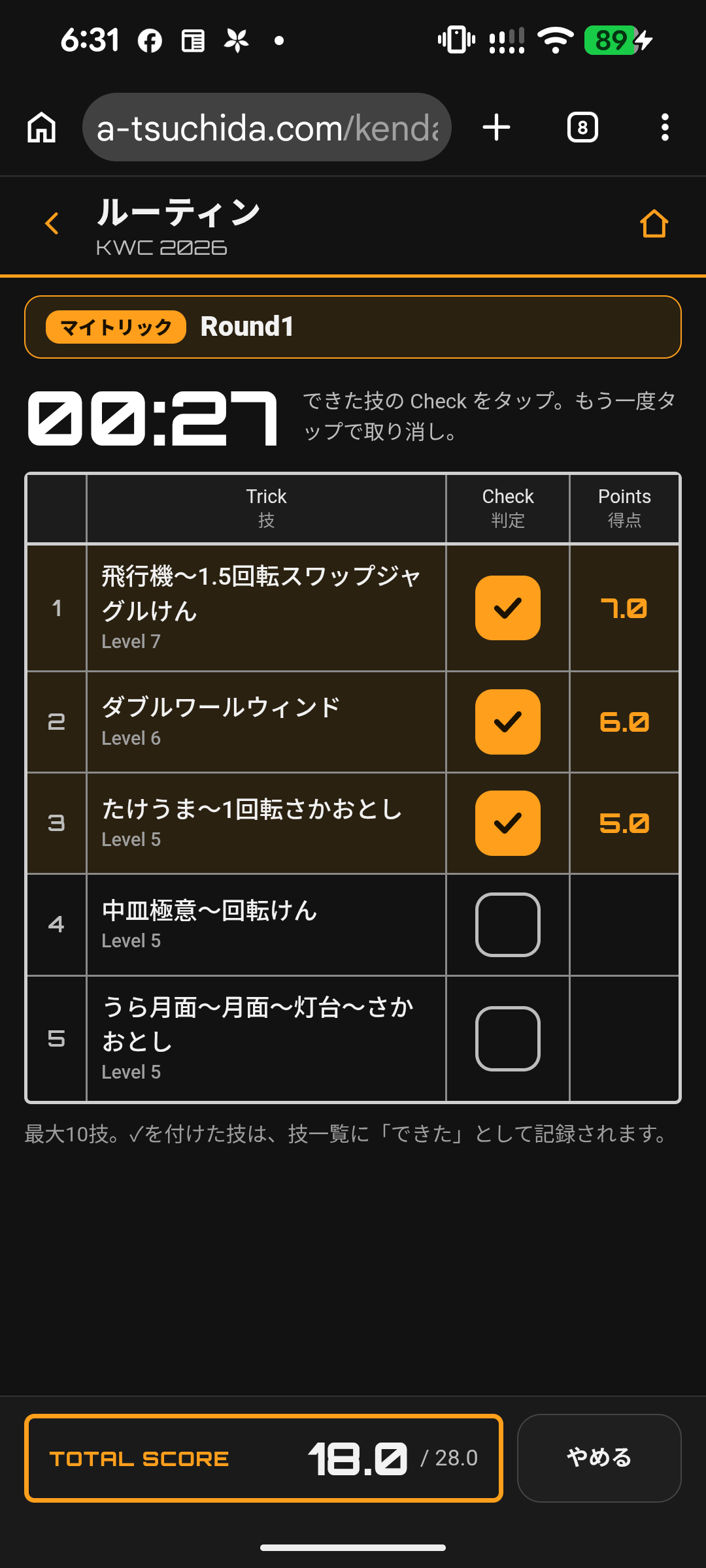
マイトリックと記録は、スマホのブラウザの中だけに保存されます。機種を変えるときは、「記録を書き出す」でファイルにして、新しいスマホで読み込めば移せます。
Select up to 10 tricks from the matrix and save them straight to My Tricks — name the list, e.g. “KWC 2026 Round 1,” and open it anytime from Home. You can reorder tricks with ↑↓ or remove them with ×. Then practice with a Routine: a score-sheet-style table of your tricks. Pick a time (1 min, 3 min or no limit), start, and tap “Check” for each trick you land to see your total score. Checked tricks are recorded as “Done” with the date. Your lists and records stay only in your phone’s browser; export them to a file to move to a new phone.
新しいゲーム「トリッククロック」で、2人で勝負|New two-player game: Trick Clock
Android版には、ランダムに出た技に挑戦する「おみくじバトル」がありました。Web版では、これを「トリッククロック」という新しいゲームに作り直しました。
ルールは、将棋やチェスの対局時計と同じです。
- 先攻・後攻が、それぞれ自分のレベルに合った技の範囲を選びます(例:先攻は KWC 2026 の Level 3〜5、後攻はけん玉検定のベーシック3級〜1級)。けん玉の子とこまの子の対戦もできます。
- 持ち時間(1人1分・3分・5分)を決めてスタート。
- 自分の番になると、スロットで技が1つ出ます。できたら、自分の側の画面のどこかを押して、相手の番へ。
- できない技は長押しでパスして引き直せます。ただし、そのあいだも自分の時間は減っていきます。
- 先に持ち時間がなくなった方の負け。 最後に、それぞれが決めた技の数と名前が出ます。
スマホを横に置くと、2人の画面が左右に並びます。レベルがちがう2人でも、それぞれの範囲で同じように勝負できるのがポイントです。
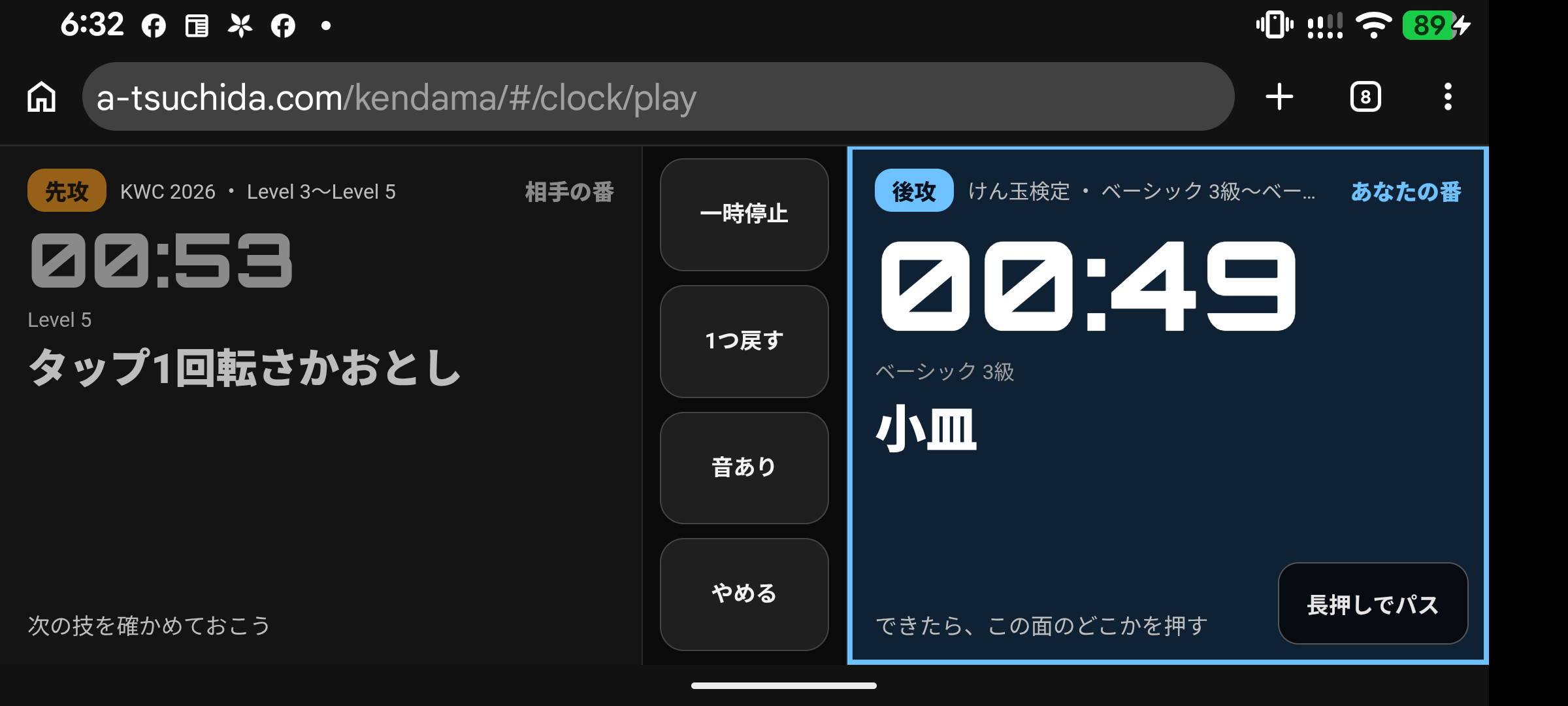
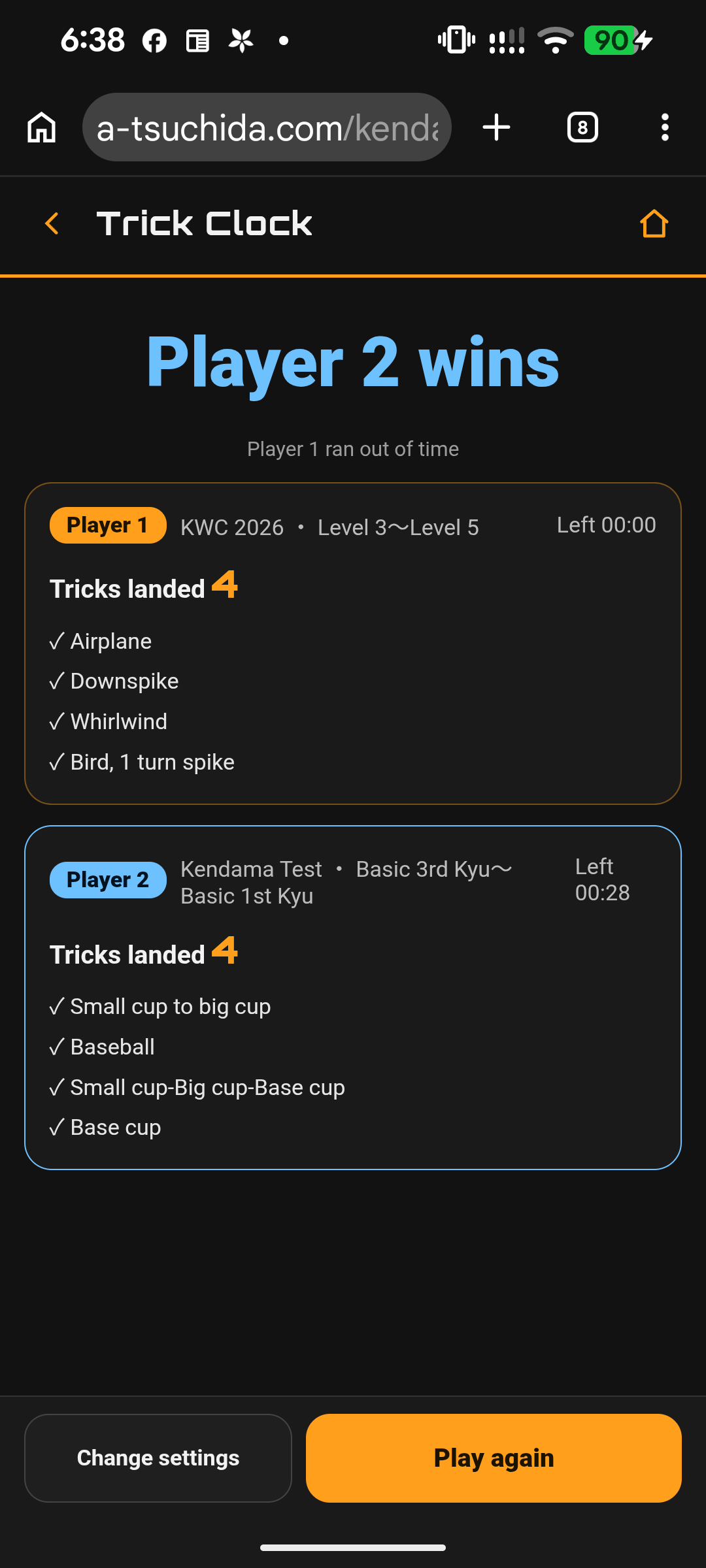
The Android app’s “Omikuji Battle” has been rebuilt as Trick Clock, played like a chess clock. Each player picks a trick range for their own level (e.g. KWC 2026 Levels 3–5 vs. Kendama Test Basic 3rd–1st Kyu). Set the time (1, 3 or 5 minutes each) and start. On your turn a slot draws a trick — land it, then press anywhere on your side to pass the turn. Long-press to skip a trick, but your clock keeps running. Whoever runs out of time first loses. Turn the phone sideways to show both players side by side. Because each player plays from their own range, players of different levels can compete on equal terms — a kendama player can even take on a spin-top player. At the end, you’ll see how many tricks each player landed, and which ones.
Android版とのちがい|Differences from the Android app
| Android版|Android | Web版|Web | |
|---|---|---|
| 使える機種|Devices | Android | iPhone・Android・パソコン|iPhone, Android, PC |
| 入れ方|How to get it | Google Play | ブラウザで開く(ホーム画面に追加できる)|Open in a browser |
| 言語|Language | 日本語・英語|JA / EN | 日本語・英語|JA / EN |
| KWC のマトリックス表示|KWC matrix | なし|No | あり|Yes |
| ルーティン|Routine | あり|Yes | スコアシート風、「できた」を記録|Score-sheet style, records “Done” |
| トリックチェック|Trick Check | あり|Yes | なし|No |
| ゲーム|Game | おみくじバトル|Omikuji Battle | トリッククロック|Trick Clock |
| 記録の書き出し|Export records | なし|No | あり|Yes |
Android版は、これまでどおり Google Play にあります。アイコンの色がちがう(Android版は青、Web版はオレンジ)ので、両方入れておいても見分けられます。
The Android app remains on Google Play. The icons differ in color (Android: blue, web: orange), so you can keep both.
Miyagi Kendama Crewsに先行配布|Early access for Miyagi Kendama Crews
いま、Miyagi Kendama Crewsメンバーに、先に試してもらっています。出てきた感想や「こうしてほしい」を聞きながら、少しずつ直していけたらと、ゆったりと考えています( 一一)
この記事を読んで使ってくれた方も、「ここが使いにくい」「この技リストもほしい」など、気づいたことがあれば、ぜひお問い合わせやInstagramで教えてください。
Members of my kendama team, Miyagi Kendama Crews, are trying the app right now, and I plan to improve it little by little, at a relaxed pace, based on their feedback. If you try it too, I’d love to hear what works and what doesn’t — please send a message via the contact form or Instagram.
記録はスマホの中だけ。非公式の個人アプリです|Records stay on your phone. An unofficial, personal app
マイトリックや「できた」の記録は、スマホのブラウザの中だけに保存され、外には送りません。どれくらい使われているかを知るために、名前のない番号と、どこから開いたかの目印(リンクに付いている場合だけ)を、このサイトに送っています。くわしくは利用規約・プライバシーをご覧ください。
また、このアプリは非公式の練習アプリです。けん玉検定・こま技検定・けん玉ワールドカップの主催団体とは関係ありません。本業が弁理士(特許や商標を扱う仕事)なので、大会のロゴや名前を、公式のものと見まちがえるような形では使わないようにしています。
Your records are saved only in your phone’s browser and are never sent out; only an anonymous number (and, if the link carries one, a tag showing where you came from) is sent to count usage (see Terms & Privacy). This is an unofficial practice app, not affiliated with the organizers of the Kendama Test, the Spin-Top Test or the Kendama World Cup. As a patent attorney, I take care not to use event logos or names in a way that could look official.
まとめ|Summary
- iPhoneでも Android でもパソコンでも、無料・登録なしで使える
- 一度開けば、ネットがなくても使える(動画はネットが必要)
- KWC 2026 の技をマトリックスで見て、マイトリックに保存 → ルーティンで練習
- 2人で遊べる「トリッククロック」で、大会の待ち時間も楽しく
Free on iPhone, Android and PC · works offline once opened · KWC 2026 trick matrix → My Tricks → routine · two-player Trick Clock
KWC 2026 に出る人も、配信で見る人も、練習のおともにどうぞ。使ってみてよかったら、InstagramやほかのSNSで紹介してね!
Whether you’re competing at KWC 2026 or watching online, give it a try — and if you like it, please share it on Instagram or other social media!
※アプリを開いたら、ホーム画面に追加すると他のアプリと同じようにスマホの画面でタップすれば使用できるようになります。
※After opening the app, add it to your Home screen. You can then start it with a tap from your phone’s screen, just like any other app.
ほかのアプリと関連記事|More apps and articles
- LAB:ブラウザで使える自作アプリの一覧(英検5級・4級のけん玉イングリッシュなど)
- けん玉で英検5級・4級が学べる無料アプリを作りました
- 3Dプリンタ製けん玉「EDEXけん玉」をゲット!
- こまの世界大会「KOMA WORLD CUP 2026」に行ってきた
参考|References
- PR TIMES「ウッドワン けん玉ワールドカップ 廿日市 2026開催!11月21日(土)、22日(日)の2日間」 https://prtimes.jp/main/html/rd/p/000000012.000046428.html (2026-11-08 閲覧)

コメント